

The CLI stopped taking input after sitting idle: our December freeze hunt
What users called "freezing" was four different problems; this is how we tracked each one down.
 8 min readEngineering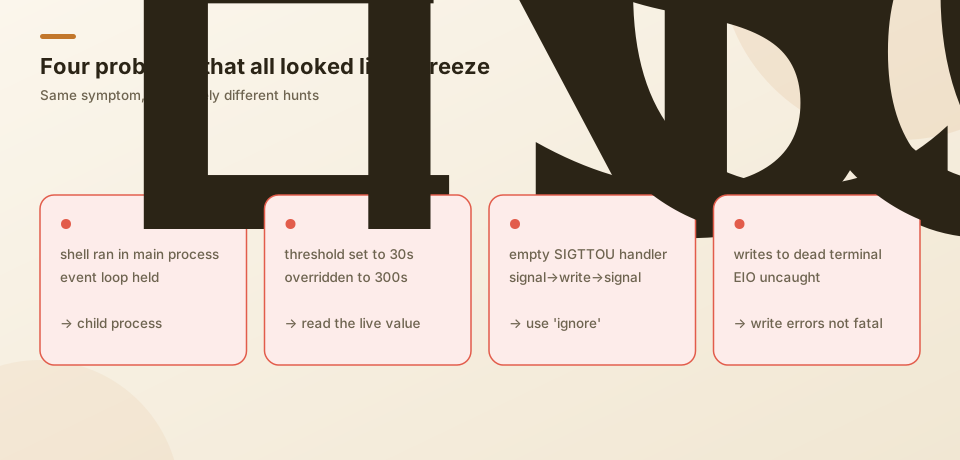
In mid-December we wrote our own ANSI renderer for the CLI: an input box and status bar pinned at the bottom, a scrolling timeline above. It looked decent, and then the freezes started. From the user's side it was one sentence: leave it for a while and you can't type anymore; you have to kill it.
Taken apart, it was several unrelated problems that happened to share the word "freeze".
1. ESC did nothing while a shell command ran
This one we figured out first. The UI said "esc to interrupt", pressing it did nothing, and the log stopped moving once the tool started.
Simple cause: execute_shell ran in the main process. A long or stuck command held the event loop, so keypresses on stdin were never processed.
On December 21 we moved shell execution into a separate child process. The main process just collects results; an ESC interrupt is forwarded to the child, which kills the command and replies "interrupted by user". After that the UI stayed responsive during long commands.
Same day: Ctrl+C and ESC were swallowed while pasting. Input handling returned early during a paste and ignored every key. Now Ctrl+C is recognized from raw bytes first, ESC can cancel a paste, and a timeout clears stuck paste state. Exit also got a fallback timeout so cleanup itself cannot hang.
2. No input after sitting idle
The nastiest one. Users said "after about ten idle minutes I can't type", and the log showed stdin perfectly healthy: isTTY, readable, listeners attached — just no keypresses arriving.
We already had idle detection: after a threshold with no input, three recovery levels (resume and reset raw mode; reinitialize input; ask the user). It should have kicked in at 30 seconds. It didn't.
First attempt: remove unref() from the check timer, add a forced retry every 120 seconds, set the threshold to 30 seconds. No effect.
Then this line in the log:
Idle for 301s (threshold: 300s), attempting recovery...The threshold was 300 seconds, not 30. Another part of the code injected a config function into the input layer that said: if the timeline has any entries, the threshold is at least five minutes. The timeline almost always has entries. So our 30 seconds had never taken effect, and the 120-second forced retry could never fire — recovery didn't even start until minute five.
Removing that "at least five minutes" turned "always freezes around ten minutes" into "occasionally freezes and recovers". Two things remained:
- The forced retry had to bite. The 120-second retry only reset recovery to level one, and level one (resume plus raw mode) does nothing for a terminal that is already stuck. Now it goes straight to level two and reopens the terminal device.
- Never give up permanently. After all three levels failed, recovery was marked disabled and never tried again. Now it starts over every 120 seconds.
The user confirmed the freeze that used to hit within six minutes was gone.
This was much like the guardrail bug in our previous post: a value we changed was silently overridden somewhere else, with no error.
3. CPU at 98% and no response at all
With idle recovery fixed, a new one appeared: occasionally the process spun above 98% CPU and stopped responding. sample showed thousands of signal-handler calls per second, stuck in a "signal handler → write → signal" loop.
To "silence" signals from background terminal I/O, we had registered empty handlers for SIGTTOU / SIGTTIN:
process.on('SIGTTOU', () => {});A background process writing to the terminal gets SIGTTOU. The empty function "handles" the signal but does not stop the write; the runtime sees the signal handled and retries the write; the write raises SIGTTOU again. Our recovery code happened to write terminal control sequences, so off it went.
The fix was to use 'ignore' for both signals. It was the first time code that looked like it did nothing bit us — an empty handler and ignoring are not the same thing.
4. Switch away, come back, the process is gone
Another class: a few minutes after a task finished, the process crashed with read EIO / write EIO / cannot open /dev/tty.
The chain: stdin gets EIO → the input layer fails to reopen the terminal → but the UI keeps refreshing (the end of a task is exactly when the whole timeline and status bar are redrawn) → it writes to a dead stdout → EIO is thrown → nobody catches it → the process exits.
We compared with Claude Code in the same situation: it does not die from this. From the outside, it tolerates failed terminal writes instead of escalating one write error into a process exit. We went the same way: catch EIO / EPIPE terminal write errors and never rethrow them; once the terminal is gone, stop refreshing the UI instead of hammering a terminal that no longer exists.
5. Finally: replacing the home-grown renderer
By around December 23 we had a long list of patches for our own ANSI renderer: scroll regions, duplicate status-bar renders, paste mode, ghosting, status-bar quirks across terminals… Each fix made sense, and new problems kept coming.
In those days we built an Ink version in parallel, made it the default on December 24, and deleted the ANSI version entirely on January 3, 2026. Ink had its own problems (memory leaks, static-region refresh) — that's the next post.
Conclusion
Working through logs, sample and process state one case at a time, we found that what users called "freezing" was four different problems: shell commands holding the event loop, an idle threshold overridden by another config, an empty signal handler causing a signal storm, and failed writes to a dead terminal killing the process.
We moved shell execution to a child process, corrected the threshold and stopped recovery from giving up permanently, made the signals truly ignored, and stopped terminal write errors from causing an exit. When we investigate similar problems now, we first establish which kind of freeze it is, then read the configuration values actually in effect from the log.